
Most guides to connecting WhatsApp to Chatwoot start at the wrong place. They open a Meta Developer account, click through to a temporary access token, and declare victory when a test message arrives. That part takes an afternoon. The part that decides whether you ship is the question nobody asks first: under whose account does the traffic run?
There are three answers, and they lead to very different builds. Pick wrong and you discover it months later, when you are migrating phone numbers or explaining to a client why their conversations live inside your billing account.
The three paths
| Direct Cloud API | Through a BSP | Tech Provider | |
|---|---|---|---|
| Who owns the WABA | You | The BSP, on your behalf | Each client owns their own |
| Who Meta bills | You | The BSP bills you, with markup | Each client, directly |
| Numbers supported | Your own | Yours | Unlimited client numbers |
| Onboarding a client | N/A | Manual, via the BSP | Embedded Signup, self-serve |
| Meta approval needed | Business verification | Handled by the BSP | App Review + Tech Provider status |
| Fits | One business, one number | Teams who want no infrastructure | Agencies and platforms |
Path 1 — Direct Cloud API
You create a Meta app, add the WhatsApp product, verify one phone number, and point Chatwoot at it. No intermediary, no per-message markup. This is the right choice for a single business running its own support desk, and it is what most published tutorials describe.
Two details catch people out. The access token Meta hands you by default expires in 24 hours — you need a System User token with whatsapp_business_messaging and whatsapp_business_management to get something permanent. And the phone number you register cannot already be attached to a WhatsApp account, personal or Business App. If it is, you delete that account first, and you do not get it back.
Use a number nobody is using. Not your main line, and not the number printed on your website.
Path 2 — Through a BSP
A Business Solution Provider resells access. You get a dashboard, support, and someone else absorbing the approval process. You pay for it twice: a markup on every conversation, and a dependency you cannot easily unwind.
The dependency is the part worth thinking about. Your number lives under their account. Migrating away is possible but it is a process, not a setting, and it usually involves downtime on a channel your customers are actively using.
For a single business with no technical team, a BSP is a defensible choice. For an agency onboarding clients, it means building your margin on top of someone else’s margin.
Path 3 — Tech Provider
Meta grants Tech Provider status to apps that onboard other businesses. Your clients connect their own WhatsApp Business Accounts to your app through Embedded Signup — they click a button on your site, log in with Facebook, and grant access. Meta bills them directly, on their own payment method. The provider never touches their money and never sits in the billing path, which means the client is not dependent on the provider for message spend, and the provider is not carrying somebody else’s bill.
This is worth asking any provider outright, because not all of them work this way – some put themselves in the billing path and invoice you for messaging on top of their own fee. Who Meta bills is the cleanest single question for telling the two models apart.
This is how the commercial platforms work, and it is available to anyone willing to go through App Review. It is also the only one of the three that scales past a handful of numbers without becoming administrative work.
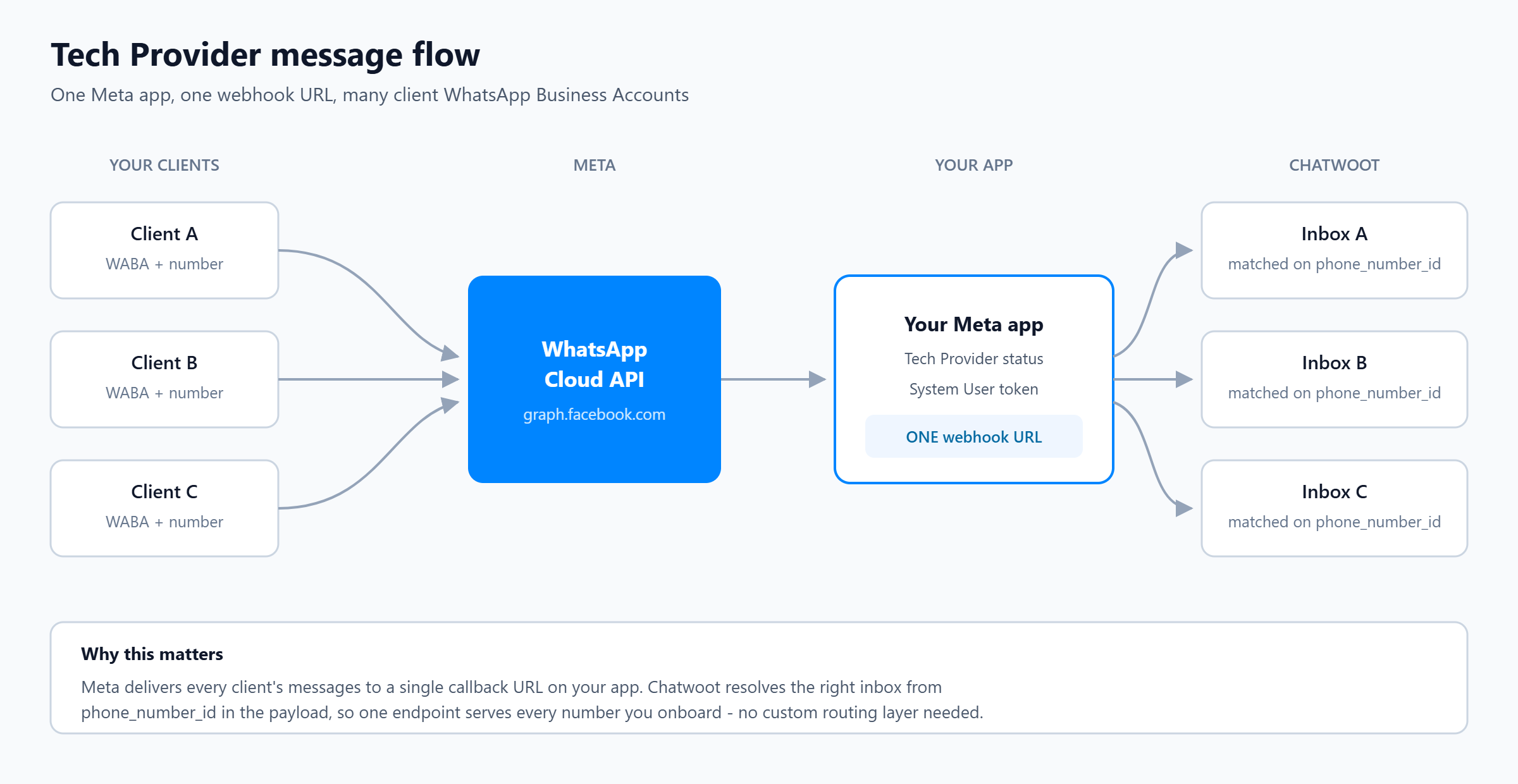
One webhook, many numbers
A reasonable fear when you first look at this: Meta sends webhooks at the app level, to a single callback URL. Chatwoot inboxes each have their own webhook path. So how do fifty clients share one endpoint?
They just do. Chatwoot resolves the target inbox from phone_number_id in the webhook payload, so a single callback URL serves every number you onboard. You do not need a routing layer in between, and building one is wasted effort.
What you do need, per client: subscribe your app to their WABA, register their phone number, and create the matching Chatwoot inbox. All three are API calls, which means onboarding can be fully automated behind the Embedded Signup button.
What actually stops you going live
The technical integration is the easy part. Three things hold up real launches, and none of them are in the setup tutorials.
1. Business verification
Get this done completely, and get it done first. Meta ties your sending limits and several account capabilities to a verified business, so an unverified account is a state to leave as quickly as possible rather than something to plan around. We treat verification as finished before a single client number goes live – it is the cheapest way to make everything afterwards predictable.
Verification requires documents proving the legal entity — registration certificate, tax identifier, an address that matches. If the business is young, or the paperwork is in a different name to the Facebook Business Portfolio, expect rounds of resubmission. Start this before you write any code, because it runs on Meta’s clock, not yours.
2. Template approval
WhatsApp lets you reply freely for 24 hours after a customer messages you. Outside that window you may only send pre-approved template messages. This is not a minor restriction — it governs every proactive notification you will ever send, from order updates to appointment reminders.
Templates get rejected for wording that reads as promotional when you submitted it as a utility, for placeholders that could produce misleading text, and for categories that do not match the content. Budget time for revisions, and write the templates before you promise a client a go-live date.
3. Knowing what it will cost
Meta charges per conversation or per message depending on category, and the rate varies by the customer’s country. A support desk answering inbound questions in one market has a very different bill to a platform sending utility notifications across several.
The published rate card changes. Check Meta’s current pricing page rather than any figure quoted in a blog post, including this one, and model your own volumes before quoting a client a monthly number.
One Chatwoot account or many?
If you are running Tech Provider, you face a design decision early: put every client’s inbox in one Chatwoot account, or give each client their own account inside the same installation.
One account is simpler to administer and gives you a single view across clients. It also means an agent misassignment exposes one client’s conversations to another. Separate accounts cost more setup and give real isolation, separate reporting, and the option to let clients log in and see their own inbox.
If the conversations belong to your clients’ customers rather than your own, separate accounts is the defensible answer. Chatwoot’s Platform API can create accounts and users programmatically, and the account’s own API creates the inbox, so the extra isolation does not have to mean extra manual work.
Choosing
- One business, one number, technical team on hand — go direct. You will spend a day on setup and nothing on markup.
- One business, no technical team — a BSP is a fair trade. Read the exit terms before you sign.
- You are onboarding other businesses — Tech Provider, and start the App Review early. Nothing else scales, and anything else puts your clients’ traffic under your account.
Working with us
We deliver both of the paths worth taking. Which one fits depends on whether you want to own the infrastructure or just the account.
You own everything. We create your Meta app, stand up Chatwoot on your own domain, and connect your WhatsApp number. You hold every credential. We hand over a working system, and can stay on for maintenance if you want us to.
We host it. You connect your own WhatsApp Business Account to our platform through Embedded Signup. Nothing to install, nothing to patch, no server to watch. You verify your business with Meta and you are live.
In both cases the WhatsApp Business Account is yours and Meta bills you directly. We never sit between you and your money, and there is no per-message markup. We charge for our own work, by the hour – the setup, and whatever advice or help you need afterwards – and nothing on top of what you send. If you start on our platform and later want your own installation, we export your data and move the account across. That option is real precisely because the account was never ours.
Tell us what you are building and we will say which of the two fits, including the honest answer if it is neither.